Point n8n at kenari
Drop an AI Agent node onto the canvas and it will not run until you fill in an OpenAI credential, when all the workflow needs is one model it can call.
n8n’s OpenAI credential works with any OpenAI-compatible endpoint, and kenari is one, so three fields cover the move: API Key takes your kn-, Base URL points at kenari, Model an id ending in :free.
Coding editors (Claude Code, Codex, OpenCode) get their own post, since the setup differs: Point your editor at kenari. This one stays on n8n.
n8n’s AI Agent runs from sub-nodes
AI Agent is a root node, which means it never calls a model on its own. You attach a chat-model sub-node underneath it plus one or more tools, and the agent works out which tool to reach for.
The n8n docs require at least one tool on an AI Agent, so the node stays incomplete until you give it one. To just smoke-test the connection, skip the agent and put an OpenAI Chat Model on a Basic LLM Chain, since the credential behind both is identical.
What matters is that the model in n8n comes from the OpenAI credential, not from a “Kenari” node that does not exist. n8n’s own credential, pointed at a compatible gateway, does the whole job.
The credential fields that actually exist
n8n calls the credential type OpenAI. From current n8n source, these are the fields it really has:
| Field | Required | Value for kenari |
|---|---|---|
| API Key | yes | kn-... from the kenari dashboard |
| Organization ID (optional) | no | leave blank |
| Base URL | no, has a default | https://kenari.id/v1 |
| Add Custom Header | no | leave off |
The default Base URL is https://api.openai.com/v1, so replace the whole value rather than editing its tail. The usual slip is appending /v1 onto a URL that already ends in one, and https://kenari.id/v1/v1/... usually comes back 405.
n8n’s credential test calls GET {Base URL}/models, and GET https://kenari.id/v1/models is public and live, so a green test means n8n already read the same catalog you would.
The header n8n sends is Authorization: Bearer <API Key>, exactly the format kenari expects. Fill in Organization ID and n8n also sends OpenAI-Organization, which does nothing here, so leave that field empty and the custom header switch off.
Three values, then attach the agent
1. A kn- key
Sign in to the dashboard, open API keys, and click Create key. The key starts with kn- and is shown exactly once, so copy it before you close the dialog, and that one key covers every model and both protocols. Store it in the credential as the API Key, never in the workflow chat.
2. Base URL
https://kenari.id/v1That is a straight swap for https://api.openai.com/v1, and n8n appends the rest of the path, whether that is /chat/completions or /models.
3. A :free model
On the OpenAI Chat Model node, the Model field loads dynamically from /models on whichever Base URL the credential carries, so type or pick an id exactly as the catalog spells it. For a first run on an empty balance, step-3-7-flash:free does the job: when we checked it sat in the catalog with pricing.free: true and tool_call: true, and AI Agent needs that second flag.
The list changes, so do not memorize an id. Check instead:
curl https://kenari.id/v1/modelsLook for an id ending in :free, or pricing.free: true on the entry. Do not stop at the suffix though. When we checked, the catalog held 16 :free ids and only 14 of them carried tool_call: true. Two did not.
Pick one of those two and the AI Agent still runs, still answers, and still looks healthy. The only thing that never happens is the tool call, and nothing in the output tells you so. Read the tool_call flag, not just the suffix.
How to choose a free model, and how they differ from PAYG or BYOK, is in Try a free model first.
Put it on the canvas
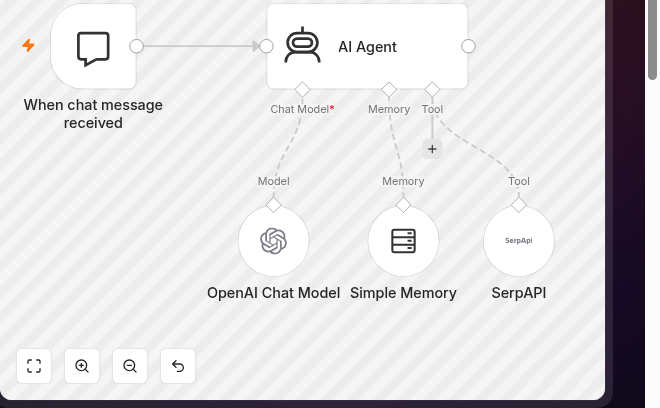
- Add AI Agent.
- Attach OpenAI Chat Model to the model slot, pick the credential whose Base URL points at kenari, and set Model to
step-3-7-flash:free. - Leave Use Responses API off. Reason below.
- Attach at least one n8n tool (HTTP Request, Wikipedia, or your own workflow tool) and let AI Agent decide when to call it.
- Run it once. If
choicesor the agent output comes back with an answer in it, the credential works.
Other workflows already on that credential move across with it, so there are no nodes to replace.
About the Use Responses API toggle
The toggle reads like the newer option, so reaching for it is a fair instinct. For n8n, leave it off.
n8n defaults to Chat Completions at /v1/chat/completions, the path we serve for OpenAI-compat clients. kenari accepts /v1/responses as well, but only as a stateless subset: previous_response_id is rejected, and tool types other than function are dropped with no message at all.
That last part is what sends people in circles. The built-in tools behind the toggle, Web Search, File Search, and Code Interpreter, all belong to OpenAI, not to the n8n tools you attached on the canvas. Turn the toggle on and those tools drop out of the request, with nothing in the response to say where they went.
If you get stuck
- Credential test red, or
401: the key is wrong, truncated on the paste, or still ansk-. Copy thekn-...again. model_not_found: the id has a typo, or the dropdown still holds an OpenAI id. Take it straight fromGET /v1/models.402 insufficient_balance: a model without:freeon a Rp 0 balance. Switch to a:freeid, or top up first.405: the Base URL is the wrong shape. It must behttps://kenari.id/v1, not barehttps://kenari.idand not.../v1/v1.429withfree_quota_rpmorfree_quota_daily: the free-model rate limit. ReadRetry-Afterand wait, or move to a paid model with balance.
None of this shifts between n8n Cloud and self-hosted n8n, since only the field values differ.