Pay for tokens with QRIS, not a foreign card
A student’s Visa gets declined on the billing page, and a two-person agency has no USD corporate card to try instead. The invoice lands in dollars at a rate that moves mid-month, so the rupiah figure is never the one you planned for.
Tokens do not have to be paid for that way. Keep a Rupiah balance, pay as you go, and start with a Rp 1.000 QRIS top-up.
Who usually gets stuck on a foreign card
What stops people is almost always the payment step rather than the price of the model.
The large providers bill in USD and ask for a card that Indonesian banks often decline, or one whose limit is too small to be useful. A student trying a single project runs into it, so does a two-person team with no foreign entity, and so does a freelancer who would rather not put client work on a personal card with a foreign label.
The pattern is familiar: the account gets created, the key works once, and then billing blocks you. Or the card goes through fine and you still have no idea how many rupiah left your account this week.
Paying as you go in Rupiah takes care of both. You top up first, each request debits the balance, and the number you are reading is in the same currency as your bank account.
Two ways to pay, one meter
On a gateway, the bill follows whoever owns the key that serves the request.
- Metered (default). The request runs on the gateway’s key pool. Tokens are counted, then deducted from your Rupiah balance.
- BYOK. The request is served by your own provider key, so those tokens do not debit the gateway balance. The usage is still recorded, at Rp 0 on the gateway side.
This article follows the first path: add balance, use it, watch the debit. BYOK is mentioned only so you know the option exists. One thing not to mix up: you still need a kn- key to authenticate, and the provider key sits behind it.
QRIS from Rp 1.000
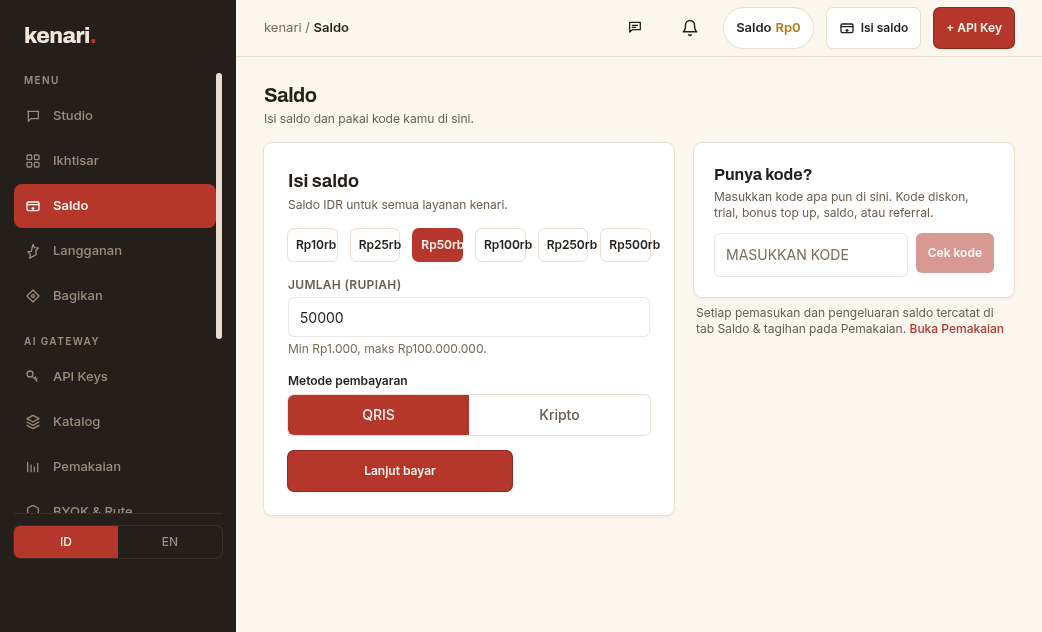
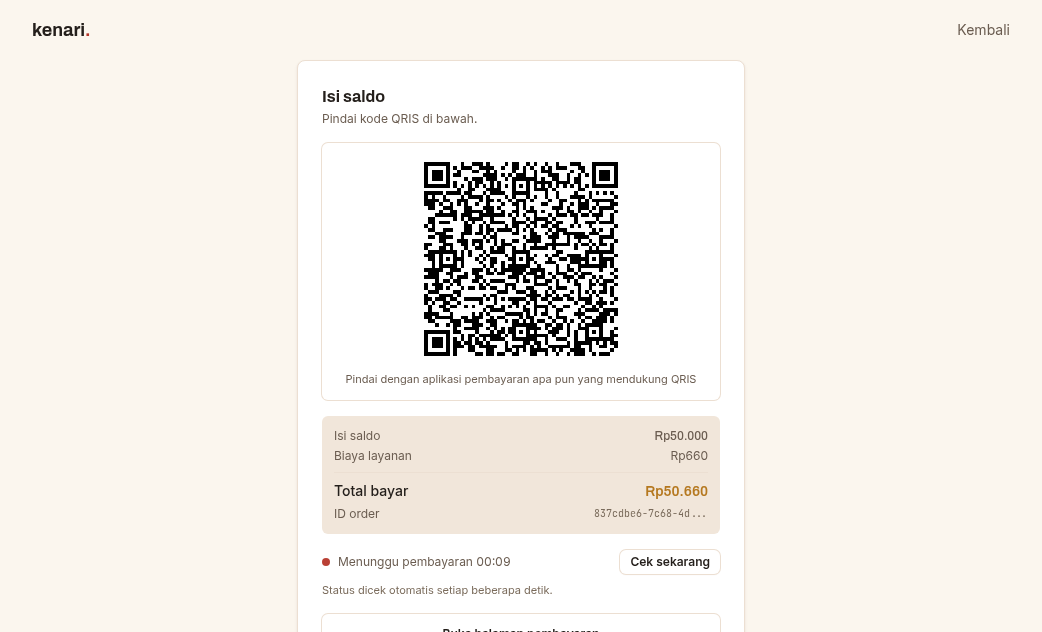
Open the dashboard, go to the Balance page, and top up with QRIS from Rp 1.000 minimum. The balance is added once the payment completes, and no foreign card appears in that flow.
The payment page sits on its own. Every invoice carries its own link, so you can reopen it while the invoice is still valid, and the status updates by itself after QRIS clears.
Beyond QRIS, balances and plans can also be paid with crypto (BTC, ETH, USDT, and others), where the invoice is issued in dollars at the platform rate when it is created, and the Rupiah balance is activated after that. The crypto minimum is USD 1. It is a side path, not the point of this piece.
Send a paid request without enough balance and the server answers HTTP 402:
{
  "error": {
    "code": "insufficient_balance",
    "message": "insufficient balance: available Rp 19,589; this request reserves up to Rp 21,500 worst-case (input estimate + max_tokens x output rate). Lower max_tokens or top up at https://kenari.id/pay"
  }
}
Those numbers come from the docs rather than from your wallet. What matters is that it names the balance you have left and the worst-case reserve ceiling, which is the input estimate plus max_tokens times the output rate, so you can tell whether to lower max_tokens or top up at kenari.id/pay.
You pay for answers that arrive, not for attempts that fail.
What is debited, and what is not
Model prices are computed per token dimension: input, output, cache-read, cache-write. The internal unit is micro-Rupiah per 1 million tokens, but the dashboard shows ordinary Rupiah per 1 million tokens, so nobody has to run that conversion by hand.
The formula, straight from the billing docs:
biaya = token * rate / 1.000.000We keep per-model rates out of this article on purpose, because they are live. Read them from GET https://kenari.id/v1/models, which is public, or from the catalog. GET /api/public/pricing is only the landing teaser, carrying the newest version per family, and incomplete on specialized models.
Rules worth keeping:
- No output, no charge. If a filter holds the answer back, the upstream comes back empty, or the connection drops before a single token is sent, the cost is Rp 0. The request still appears in history.
- Reasoning is still output. A model that thinks for a long time is spending output tokens, so when
max_tokensis small the whole budget can go on reasoning before a word of the answer gets written. That is still billed. :freemeans Rp 0, with limits. One example that was still live when we checked:step-3-7-flash:free. The per-minute and daily limits live on the plans page, and:freeis best-effort.
Optional subscription plans run on window quotas of 5 hours, a week, and a month. While quota remains, requests draw on that quota instead of your balance. Once the window is empty and PAYG is off you get HTTP 429 plan_limit_reached, so turn PAYG on if you would rather requests kept running from balance.
When BYOK makes more sense
Top up with QRIS when you want one Rupiah bill and no card parked at every provider you touch.
BYOK is the better fit if:
- you already have credit or quota sitting at OpenAI, Anthropic, or another provider,
- you want certain requests to run on your own account,
- you want the gateway’s meter and routing without paying for those tokens on the kenari side.
Registering a key takes one visit to the BYOK page and the Add API key / Tambah button. After that kenari tries your BYOK key first for the model requested, the provider bill stays on the provider account, and the row in kenari analytics reads Rp 0.
There is also a Cadangan saldo kenari (kenari balance backup) toggle. With it on, a request that has burned through every key of yours carries on into the paid pool and debits balance instead, and if the balance is too low, the card shows a warning next to an Isi saldo (Top up) link.
This is not a full BYOK guide. QRIS and BYOK both run through the same meter, and you can have both set up at once.
If you have never sent a request to kenari at all, the steps are in your first request from zero.
What shows up in history
After a paid request runs, history records the input tokens, the output tokens, and the Rupiah used. A :free model still writes its row, at Rp 0.
A request that produced no answer can still leave a row behind with zero cost, which is the no output, no charge rule doing its job rather than a dashboard bug.
The reserve quoted in a 402 is larger than the debit that follows it, because the reserve is built from an input estimate plus max_tokens times the output rate, while the debit follows the tokens that were actually produced. So when the reserve ceiling is what blocked you rather than the remaining balance, the fix is to lower max_tokens.
A subscription plan changes where the money comes from, not the shape of the API. The model field and the base URL stay where they are, and what moves is the order: window quota first, then balance, depending on the PAYG toggle.
How to read a bill without a surprise
One request can turn into more than one row. Reading a document, for instance, adds a per-page row next to the model’s token row, and server tools (kenari_web_search, kenari_web_fetch) are billed per call, separately from tokens.
A reservation is not the final charge either. A 402 quotes a worst-case ceiling, while the real debit follows the tokens that actually came out, with the no output, no charge rule on top.
Do not compare a price per 1 million tokens against the cost of one chat, either. A short chat sits far below 1 million; the catalog quotes 1 million so models can be compared apple to apple.
It is easier to just do the arithmetic. GET /v1/models quotes prices in micro_idr_per_1m_tokens, so divide by a million to get Rupiah per 1 million tokens. When we checked, gpt-oss-120b sat at Rp 630 per 1M input tokens and Rp 3.500 per 1M output. One short exchange, say 500 tokens in and 300 out, lands under two Rupiah. That puts Rp 1.000 at roughly 700 exchanges of that size.
Large models are a different story. The same arithmetic on claude-sonnet-5 comes to about Rp 84 per exchange, so Rp 1.000 is gone in a dozen. Both are reasonable. What decides the number is which model you call, not how much balance you loaded.
Those figures move, so treat them as a worked example of the method rather than a price list.
And the dollar figure on a crypto invoice has nothing to do with the model price. Model prices are already in Rupiah, and crypto is only a way of getting balance in.
For students and small teams
Top up Rp 1.000, pick something cheap from the catalog, or sit on :free for a while. One key covers the script, the PR, and the class demo, and if the project sticks you top up again. There is no monthly minimum on the PAYG path.
For a team it is one account with several labeled keys, so an intern’s key can be revoked without killing production while the balance stays in one place. That is easier to audit than seven USD invoices.
If your client pays the provider, use BYOK. If you are the one floating the tokens, QRIS.
Open Balance, add Rp 1.000, or stay on :free until you know the model fits. Either way the bill finally reads in the same currency as your bank account.