BYOK through kenari
BYOK means your provider key is the one that serves the request, so your provider bills you as it always has. kenari stays what it was: one endpoint, one kn-, and a record of what went through. Tokens that run on your provider key do not debit the kenari balance, and you still get its routing and analytics.
This post is about the product, not an editor setup, so if you only need to point a tool at kenari, Point your editor at kenari covers that. With no provider key and no wish to top up yet, start at Try a free model first.
When BYOK, when PAYG balance
Three billing modes share the same endpoint, and the only thing separating them is which key the request goes out on.
PAYG (metered). The default. Your request goes out on kenari’s key pool, the tokens get counted, and the cost comes off your Rupiah balance. Ask a paid model for something on an empty balance and you get HTTP 402 insufficient_balance back.
BYOK. A provider key you registered serves the request, so the provider bills their account. kenari records the usage anyway, at Rp 0, and your balance stays where it was.
:free. Still kenari’s pool, still Rp 0, but with a per-account limit. Neither BYOK nor PAYG, just a way to test something without spending.
Reach for BYOK when the provider quota or credit is already there and you want one kn- and one usage history without paying twice. PAYG makes more sense when you would rather not manage a provider key, or when the model only lives in kenari’s catalog. :free is for the first connection test, before any of this matters.
None of that retires kn-, because that key is still what authenticates you at the gateway. Your provider key never leaves the dashboard, so n8n, your editor, and your SDK never see it.
What kenari still does
One request, one header, exactly the one you already have:
Authorization: Bearer kn-...kenari tries your BYOK key first for the model you asked for, and if that key is healthy the request goes straight through and your provider bills you for it. The usage row still shows up at zero cost, so tokens and requests stay visible.
Register several keys for one provider and the order is top to bottom on that card. kenari takes the healthy one, and when a key stalls or errors it moves to the next row.
Automatic routing for metered models works as it did on kenari’s side. For an order of your own, a different model at each step or a few extra conditions, open Rute and build it there. The route name goes in the model field like any ordinary model id.
Nothing changes in the client: base URL https://kenari.id/v1, key kn-. What changes is whether those tokens debit balance.
What is not charged, and what still is
The docs are blunt about it: Model usage through your own key does not touch your balance. The usage row still gets written, at Rp 0, because you still want to see what ran.
There is one written exception. Per-search web search fees still come off your balance on a BYOK request, because the kenari_web_search server tool is not model tokens.
No separate “gateway fee” is added to a forwarded BYOK request either. What is Rp 0 is the tokens that ran on your key, and that is the whole claim. If Cadangan saldo kenari (kenari balance backup) is on and all your keys fail, the request can carry on through kenari’s paid pool, but by then it is PAYG and your balance is charged at catalog rates.
Dashboard steps
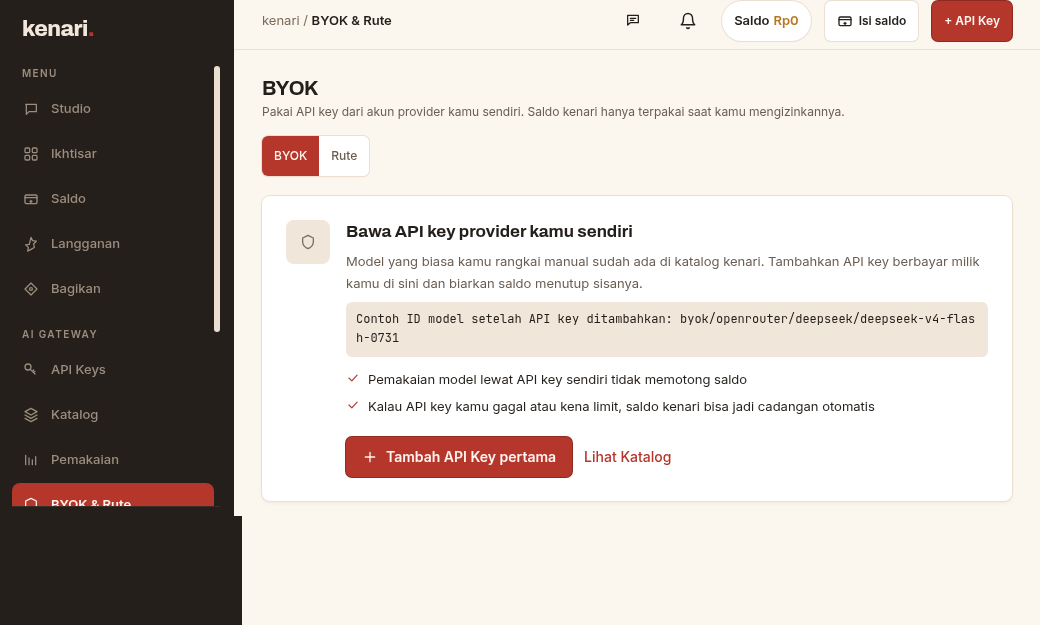
The labels below come from the BYOK docs, and the dashboard page is /byok.
- Open BYOK. Every provider gets one card, and the rows inside a card are the dispatch order.
- Hit Tambah (English docs: Add API key) at the top right, pick the provider, paste the key, then Simpan. kenari saves it and checks it in the background, and that check becomes the row status.
- Periksa (Check) on a row runs the same check while you wait, so the status updates immediately.
- The menu at the end of each row holds Edit, Disable/Enable, Delete, Raise priority, Lower priority. The priority pair only matters once a card has more than one key.
- On the new key’s row, open Lihat model, copy the full id, and paste it into your app’s
modelfield.
If your provider is not on the list, pick Custom, then fill in a provider name, the base URL of an OpenAI-compatible or Anthropic-compatible endpoint, the API kind, and the key itself.
One status per row, one dot:
| Status | Meaning |
|---|---|
| Aktif (Active) | Passed the check, ready to serve. The line may add “used 2 hours ago” or “never used”. |
| Jeda (Paused) | Out of service for a while, from rate limiting, a provider incident, or quota you used up. It recovers on its own after the cooldown. |
| Gagal (Failing) | The provider rejected the key, so nothing flows here until you fix it. |
| Status tidak diketahui (Status unknown) | It cannot be probed, or your custom base URL has no models endpoint. A real request that succeeds can flip it to Aktif. |
| Belum diperiksa (Not checked yet) | A new key whose first check has not finished. |
| Nonaktif (Disabled) | You turned it off with Disable, and it serves nothing until you turn it back on. |
A red dot means the key will not serve and a green one means it will, while a dim dot means the check has produced no answer yet.
Balance backup, then routes
Every provider card has a Cadangan saldo kenari (kenari balance backup) toggle in its header, and all it does is add one kenari entry at the lowest priority.
- On, and all your keys fail or hit a limit: kenari carries the request through the paid pool and charges your balance at PAYG rates.
- Off: the request fails along with your keys, and that is the end of it.
- On but the balance is too low: a red warning sits next to the toggle with an Isi saldo (Top up) link, because the backup cannot cover anything until balance is added. Requests to the paid pool fail while balance is insufficient.
Card order is the only built-in default. For control at each step, open Rute, build the steps out of a credential and a model, and send the route name as model.
The docs name the obvious pattern: BYOK first, kenari pool as the backup. Cheapest model first, stronger model next, works the same way.
No code change
An ordinary request with a kn- key. When the model you asked for is available on your BYOK key, kenari uses that key first.
curl https://kenari.id/v1/chat/completions \
  -H "Authorization: Bearer kn-..." \
  -H "Content-Type: application/json" \
  -d '{
    "model": "deepseek-v4-flash",
    "messages": [
      {"role": "user", "content": "Halo"}
    ]
  }'
For models outside kenari’s catalog you register nothing new, you just send the id with a byok/ prefix:
byok/<provider>/<model-id-at-your-provider><provider> is your key’s provider type, not the label you gave it, matched case-insensitively, and the rest is forwarded verbatim, slashes and colons included.
The docs give these examples: byok/openrouter/deepseek/deepseek-v4-flash-0731, byok/groq/llama-4-70b, byok/ollama-local/qwen3:32b.
This path does not draw down balance either, and the usage row is still Rp 0.
curl https://kenari.id/v1/chat/completions \
  -H "Authorization: Bearer kn-..." \
  -H "Content-Type: application/json" \
  -d '{
    "model": "byok/openrouter/deepseek/deepseek-v4-flash-0731",
    "messages": [
      {"role": "user", "content": "Halo"}
    ]
  }'
A few errors are worth knowing on sight. A bad id format comes back 400 byok_malformed_model_id, no key for that provider gives 400 byok_provider_not_found, and keys that exist but are all unusable, disabled or cooling down, give 403 byok_credential_unavailable.
Spend limits on a kenari key
A kenari API key carrying a spend limit (a Rupiah cap) cannot use BYOK models. A spend limit counts the Rupiah kenari records, BYOK records Rp 0, so the cap would never be reached and would bound nothing.
To bound BYOK on a key you share, use a token limit instead, since tokens are the unit BYOK actually consumes.
A key that hits that cap gets 403 byok_spend_capped_key.